
A practical mini‑playbook for senior engineers to think about security-first systems – co-authered by o3.
Why Security shouldn’t be an afterthought
Many Software Engineers treat Security as a second-class citizen when working on a large-scale system design. They focus on the non-functional attributes like scalability, performance, throughput, reliability etc but often miss out on a key parameter of any well rounded design – Security.
Imagine this: a senior engineer gets an urgent page – their AI-powered customer support bot is mysteriously spewing out snippets of other users’ conversations. It turns out a subtle bug in a shared library allowed requests to mix data between users in openai.com outage. Few weeks earlier, a developer at another company found that adding a simple word like “Sure” to a prompt made an AI coding assistant reveal how to generate malware, bypassing its safety filter in Github Copilot Jailbrake. These real-world incidents highlight how even advanced AI systems can fail in surprising and insecure ways.
A Security mishap with Gen AI systems can lead to sensitive data exposure, malicious misuse of AI, compliance failures, and erosion of customer trust. Here’s a playbook that provides a pragmatic guide for engineers to build GenAI systems with security in mind from the ground up. The notes below hit the essentials like identity, auth, data privacy, guardrails – security principles keeping your agents safe.
Start with “Zero Trust”
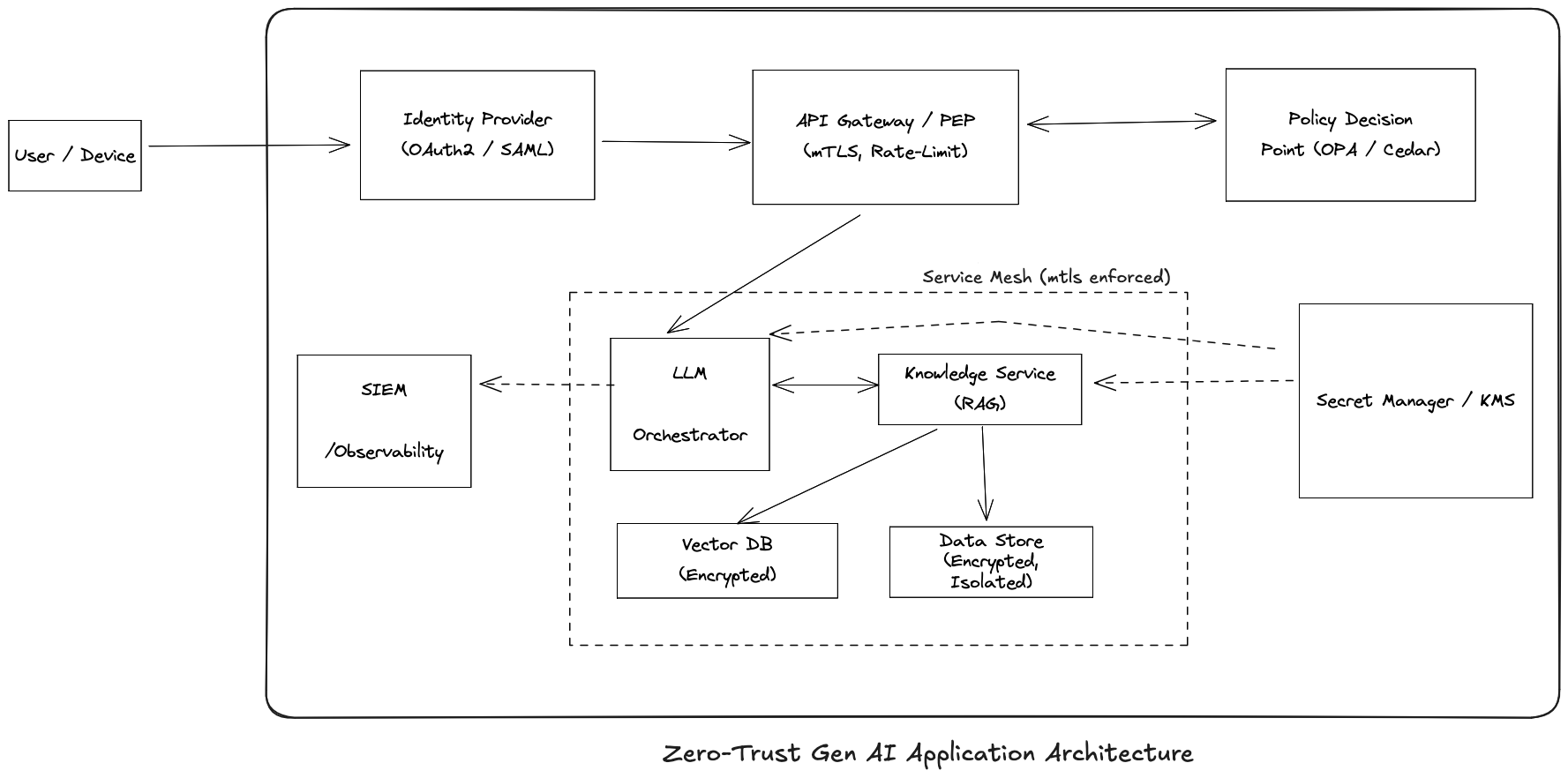
In a GenAI world, every microservice, human, and AI agent is now an autonomous principal that can create new workflows on the fly. The old perimeter security (“it’s in the VPC, so it’s safe”) collapses. Zero Trust security model (or as I like to remember it – ‘assume-the-worst’ model) is the only way to secure systems – assume breaches will happen, verify every network call interacting with your system, and limit blast radius in case an issue occurs.
Key pillars of a Zero-trust architecture should include:
- Verify explicitly: Every request, whether from a human user, microservice, or AI agent must prove its identity and intent. This means enforcing strong authentication at every layer, using cryptographic credentials (like mTLS certificates or signed JWTs), and validating them on every hop. Don’t assume internal traffic is trustworthy just because it originates from inside your VPC or cluster.
- Assume Breach: Design as if an attacker already lurks in your environment. Verify each inter-service call and database query as though it came from an untrusted source. For example, if your AI agent wants to fetch user data, it should prove its identity and permissions first. This contains the blast radius if any one component is compromised. A breached AI agent shouldn’t have carte blanche access to all data.
- Least Privilege Principle: Give each AI service or agent the minimum access rights necessary – no more. If a chatbot only needs read-access to a knowledge base, don’t also give it write or admin rights. By limiting privileges, even if an attacker hijacks an AI component, the damage is limited. This doesn’t just apply to AI agents – the same is true for all services, applications, third-party systems and even employees of your company.
Here’s a quick “Why → How” rundown below to understand the first principles of Zero-trust security architecture: identity, authN/authZ, data privacy, and guardrails in your system:
Strengthen Identity and Credentials Management
Why: Identity is the new perimeter. Every service, user, and AI agent needs a strong, verifiable identity – and the credentials (keys, tokens, certificates) that prove that identity must be managed with extreme care. Many of the worst GenAI security failures boil down to stolen or weak credentials. In the Storm-2139 incident, attackers simply scraped leaked API keys to take over Azure OpenAI accounts.
How:
- Adopt Workload Identity (e.g. SPIFFE/SPIRE or Cloud IAM): Equip each microservice or AI agent with an independent identity and auto-renewing certificate. For example, instead of embedding an API key to let your LLM service talk to a vector database, the LLM service would present its SPIFFE-issued cert and be recognized via mTLS (mutual TLS). This approach was pioneered by cloud-native companies (e.g., Google’s service accounts and Spire in CNCF) to ensure no service trusts another without cryptographic proof of identity.
- Use Short-Lived Tokens & Credentials: Set short TTLs (e.g. 10 minutes) on tokens and automate renewal. Have services request new tokens when needed rather than storing long-term secrets. AWS’s Security Token Service (STS) popularized this: rather than long-lived AWS keys, you assume a role and get temporary creds that auto-expire. This drastically shrinks the window in which a leaked credential is useful to an attacker.
- Store Secrets Securely: Use vaults or cloud secret managers. Never put API keys or passwords in code or in environment variables in plain text.
- Credential Scanning: Use automated scanners (like GitHub’s secret scanning or truffleHog) in your repos and CI pipelines to catch secrets if they ever slip in. Enforce that no human should manually handle production AI service creds – it should all be automated and logged. Short-lived certs or tokens help here too, because even if a developer sees one, it’s temporary.
- Immediate Revocation: Be ready to revoke or rotate credentials at the first hint of compromise. For example, if an employee leaves or if unusual access is detected, rotate the keys now, not next week.
Real-world example: GitHub’s Copilot token leak exploit showed the danger of poor credential handling. Attackers found they could intercept the Copilot extension’s API token by configuring a proxy. The token was sent in plaintext, allowing unlimited access to the underlying OpenAI API. A fix was to encrypt or pin the connection so tokens can’t be snooped. The lesson: always assume your tokens might traverse hostile territory and protect them (via TLS, certificate pinning, or avoiding sending them entirely by using mTLS).
Strong Authentication (mTLS, JWTs, and Beyond)
Why: With identities in place, authentication is the gatekeeper for every interaction. It’s how a service or user proves “I am who I claim to be.” In a security-first system, every single request – whether it’s an end-user calling an API or one microservice calling another – should carry some form of authentication token or certificate that gets validated. Put simply – No authentication, no entry.
How:
- Universal mTLS: Configure your service mesh or network stack so that all internal RPCs require certificate authentication – a good way is to use the CNCF-maintained Envoy Proxy. Issue and rotate certs via an internal CA or use a cloud solution (like AWS ACM for secure cert distribution). For end-user facing components, JSON Web Tokens (JWTs) are a common way to propagate identity. For example, your front-end gets an OAuth2 access token (a JWT) after the user logs in, and it sends that token with each request to your backend or AI service. The backend must verify the token’s signature and claims (using your public key or an identity provider). JWTs should be short-lived and bound in scope.
- Central Identity Provider: Use a system like Auth0, Okta, Azure AD, or your own OAuth2 server to manage user logins and tokens. Ensure all services validate incoming user tokens against this.
- Secure Session Management: If your AI app has a web component, use secure cookies or token storage, enable HTTP-only and Secure flags on cookies, and consider rotating session tokens periodically. If AI agents run on edge devices or user devices (like a mobile app using an on-device model), ensure the device or app is authenticated too. Techniques include device certificates or binding a user’s token to a device fingerprint.
- Automate Expiration and Revocation: Integrate a way to revoke tokens (e.g., a token blacklist or by design short expiry). If a user is deactivated or a service compromised, you can immediately cut off its access by invalidating credentials (as mentioned above in Immediate Revocation).
- Test Authentication Paths: As part of security testing, attempt to call your APIs without auth or with invalid tokens to ensure they’re properly locked down. Also test that expired credentials are rejected.
Real-world analogy: In 2025, AWS emphasized that “APIs should always verify that the caller has appropriate access” for each request – it’s not just best practice, it’s essential for tenant isolation and security. In the context of GenAI, that means even an internal call from your AI module to a database should be subject to scrutiny.
Fine‑Grained Authorization (Least Privilege in Action)
Why: Authorization asks “What are you allowed to do?” It’s not enough to know which user or service is calling – a security-first system must also check that the action requested is permitted for that identity, in that context. This is where fine-grained authorization and policy engines come into play, ensuring the principle of least privilege is enforced at every step.
Traditional systems often used coarse roles (“admin”, “user”, etc.) and simple access rules. But GenAI systems might have more complex needs: for example, an AI agent might be allowed to read certain data but only write to a specific log, or a user might be allowed to retrieve insights from the AI on their own documents but not others
How:
- Choose a Policy Engine: Deploy OPA if you want an open source local solution (possibly as a sidecar container with each service or as a central service). If you’re in AWS ecosystem heavily, consider AWS Verified Permissions with Cedar for a managed approach.
- Centralized Authorization logic: Enumerate what each role/service/agent in your system should be able to do. Instead of scattering permission checks throughout your code, define them as policies in a policy engine. For example, you can write a policy in OPA’s Rego language or AWS Cedar that says, “LLMService can access VectorDB index X if and only if the user in the request owns that index.” Your service then just asks the policy engine, “Allow or deny?” This makes it much easier to audit and update rules without hunting through code. It also ensures consistency across the board. If multiple services enforce the same policy via a central engine, you won’t have one service accidentally out of sync with weaker checks.
- Attribute-Based Access Control (ABAC): Both OPA and Cedar support ABAC, meaning decisions can consider attributes of the user (role, department, clearance), the action (read/write), the resource (data classification, owner), and environment (IP address, time). This granularity is powerful. For instance, you might allow a data science team’s AI agent to access customer data only if it’s running on an internal IP and during business hours, adding an extra layer of protection.
- Implement PEPs: Update your services to query the policy engine (Envoy is a good candidate) on each sensitive action. For example, before an AI agent service fetches any user data, it calls
authz.allow(agent_id, action=“read”, resource=“user123:document42”). Only proceed if the answer is allowed. Make this check non-bypassable and log the outcomes. - Policy Versioning and Testing: Manage your policies like code – test them (e.g., does a forbidden action truly get denied?), and have a process to update them (with code review). A policy bug could be as dangerous as a code bug. Use unit tests or integration tests to simulate requests that should be denied and ensure they are.
- Audit and Lease: Periodically audit which identities performed which actions via logs. Also, implement short-lived permission grants (just-in-time access) where possible. For instance, if an admin wants to allow an AI agent to do something unusual, maybe grant it for one hour and then auto-revoke – don’t leave elevated access hanging around.
Real-world tie-in: Multi-tenant SaaS products have long done this to ensure one customer can’t see another’s data. For instance, AWS itself enforces tenant isolation so strictly that even if two customers’ data sit in the same physical database, any API call is always checked to confirm you’re only accessing your own records. We should treat each user’s (or each tenant’s) prompts, vectors, and outputs with the same rigor. The OWASP Top 10 for LLMs calls out Inadequate Sandboxing as a risk – if your AI can perform actions, you must sandbox what it can do. Fine-grained auth is a form of sandboxing at the API/data level.
Data Privacy Controls (Encryption and Isolation)
Why: GenAI systems are data-hungry – they train on data, embed data into vectors, and generate data as output. This makes data security and privacy a paramount concern. If security is an afterthought, an AI feature can quickly become a data leak vector. We need to safeguard data wherever it lives or travels in the system: in transit (moving between services), at rest (stored in databases or files), and even in the AI model’s memory or embeddings.
How:
- Encrypt the data in transit and at rest: For each datastore (SQL, NoSQL, vector DB, file storage), turn on encryption at rest. Use separate keys or KMS key policies to limit access (e.g., the key for tenant A’s data is only accessible by the tenant A service). Most managed databases (Aurora, Cosmos DB, etc.) and storage (S3, GCS) support a flip-of-a-switch encryption using AES-256. Use customer-managed keys (CMK) if you need control (so you can rotate keys or revoke access centrally). Encryption at rest protects against scenarios like someone getting hold of a disk or a backup – they can’t read the data without the key. It’s also a compliance must for many regimes (GDPR, etc.) Also, we touched on this with mTLS – all network communication should be encrypted (TLS 1.2/1.3 at least). This prevents eavesdropping or tampering by attackers on the network. It’s table stakes nowadays, but make sure even internal service calls aren’t using plaintext just because they’re within a VPC or data center.
- Namespace Your Vectors: If using a vector database for retrieval-augmented generation (RAG), create separate collections or namespaces per user or per data domain. The application should specify the namespace when querying, so it never mixes data. Test this by trying cross-tenant queries (they should return nothing).
- Secure Backups and Exports: Don’t forget that backups, data exports, or training data files also contain sensitive info. Encrypt backups and restrict who can access them. If your AI periodically dumps embeddings to a file, treat that file as sensitive.
- Data Retention Policy: Minimize how long you keep sensitive user data and prompts. If you don’t need it, don’t store it. Less data retained is less data that can leak. If you do need to keep logs (for model improvement or audit), consider hashing or redacting PII within them. If your AI system serves multiple clients (multi-tenant) or handles multiple categories of data, enforce isolation. For example, use separate indexes or namespaces in your vector database for each tenant
- Sanitize Outputs: If your AI outputs could include sensitive data (say it summarizes a private document), ensure that when displaying or storing that output, it’s only visible to the authorized user. It might sound obvious, but under pressure to ship features, it’s easy to, for example, log an AI’s full response, including user data, into a monitoring system that many engineers can see. Censor or mask things at the boundaries.
Real-world incident for context: The ChatGPT March 2023 outage was a wake-up call on data isolation – a bug in an open-source library caused data from one user’s session to leak into another’s, including payment info. While it wasn’t a hack, it demonstrated how any weakness in isolation can lead to privacy breaches.
Guardrails & Operational Safeguards
Why: No matter how much we lock down identities, auth, and data, the very behavior of GenAI itself can introduce risk. By design, AI systems generate new content and can take actions; this flexibility is what makes them powerful and dangerous. Guardrails are about putting constraints and monitors around AI behavior, so that even if something unexpected is attempted, you have a catch-net. Operational practices ensure you can respond and adapt quickly when (not if) issues arise.
How:
- Moderation Layer: Implement a check for AI outputs. This could be a simple keyword scan or an AI-based classifier. Start with at least a blacklist of clearly disallowed content (e.g., “social security number”, profanity, etc.). Evolve it over time. For instance, OpenAI provides a moderation API that can flag or block disallowed content. If you build an AI assistant, have it check its response against a set of rules (no PII leakage, no hateful language, etc.). This is an outside-the-model guardrail to complement the model’s own training.
- Tool Whitelisting: If your AI agents can execute code, call APIs, or otherwise take actions in the world, put strict limits on those actions. For example, if you have an AI agent that can browse the web and run code (a la AutoGPT), you should sandbox its execution environment heavily (run it in a VM or container with no network access except what you proxy, limited CPU/memory, no access to your internal network). Also, implement an allow-list of tools: the agent should only be able to call specific approved APIs. And for critical actions (like, say, transferring money), require an additional confirmation or human approval step. If using frameworks like LangChain to give tools to an LLM, explicitly specify which tools and no more.
- Monitor Dashboards: Monitor how your AI features are used. If you see a sudden spike in requests or a user input that looks like an attempt to prompt-inject or trick the model, flag it. Rate limiting can slow down automated abuse. Set up dashboards and alerts for AI usage metrics. Tie them into your SIEM if you have one. If your security team uses something like Splunk or Azure Sentinel, feed AI logs there with proper tagging so they can correlate unusual events.
- Pentest your AI: Before attackers do, try to break your own system. Conduct regular “red team” exercises where someone on your team (or a hired expert) acts as an attacker against your AI: they’ll try prompt injections, try to find which inputs cause it to disclose secrets or behave badly, try to exploit the surrounding system (SQL injections, XSS in prompts, etc.). Include your AI endpoints in regular penetration testing. Fix any issues they find and thank them.
- User Feedback Loop: Provide a way for users to report weird or unsafe AI behavior. Sometimes users will notice an AI response that seems like a privacy breach (“Hey, this AI just mentioned data from someone else’s account”). Make it easy for them to alert you, and treat those reports seriously and gratefully – they’re essentially free security testing.
- Incident Response Playbooks: Despite all precautions, assume something will go wrong. Have a clear plan for various scenarios: What if an API key is leaked? (You should have a way to rotate keys quickly) What if an AI model starts giving out customer data due to a bug? (Maybe an immediate kill-switch to disable that feature until fixed.) What if a hacker uses your AI service to generate illegal content?
Focus on High-ROI Measures
You might have read that Security is Economics (If not, read this great Intro to Security Principles). As a senior engineer or tech lead, part of your role is balancing security with time and resources. While ultimately you want all these practices, you should prioritize those that mitigate the most likely and impactful threats first.
Security is not a one-time checklist but a culture and mindset, especially with the dynamic and highly evolving landscape of AI. By thinking “security-first,” you as an engineer are instilling habits in your team’s design and development process that will pay off tenfold in reliability and trust. The goal is to enable all GenAI’s awesome capabilities without endangering users or the business.
In practice, a simple security-first GenAI system will look like this: AI services that mutually authenticate and talk over encrypted channels; each service and user operating with just the permissions they need; data locked down so that even a clever prompt can’t escape its silo; AI outputs vetted so they don’t become the next PR disaster; and an ops team ready to pounce on any weird activity. It’s an ecosystem where security and privacy are built-in features, not afterthoughts.
Use this playbook as a living reference. Share it with your teams, discuss the real-world examples to brainstorm “could this happen to us?” and “how do we prevent it?”. Encourage engineers to think in terms of abuse cases alongside use cases. When designing a new AI feature, ask the same question you would for any critical system: “What’s the worst that could happen here, and have we guarded against it?”
By following the principles of Zero Trust, least privilege, defense in depth, and continuous vigilance, you’ll significantly lower the risk of a breach or incident. In the end, security-first engineering is just good engineering – it builds systems that are robust, trustworthy, and respectful of the users we serve. Now, go forth and build amazing things, securely!
PS: If you’re new to the field of Security, or just want to refresh your memory, go through this short but comprehensive 101 course by UC Berkeley, which covers all the Security first principles.
 Aditya Rohilla
One thought on “GenAI Systems Need a Zero‑Trust, Security‑First Mindset”